Showing posts with label Firefox. Show all posts
Sunday, February 5, 2012
Firefox Beta with New Developer Tools and Add-on Sync
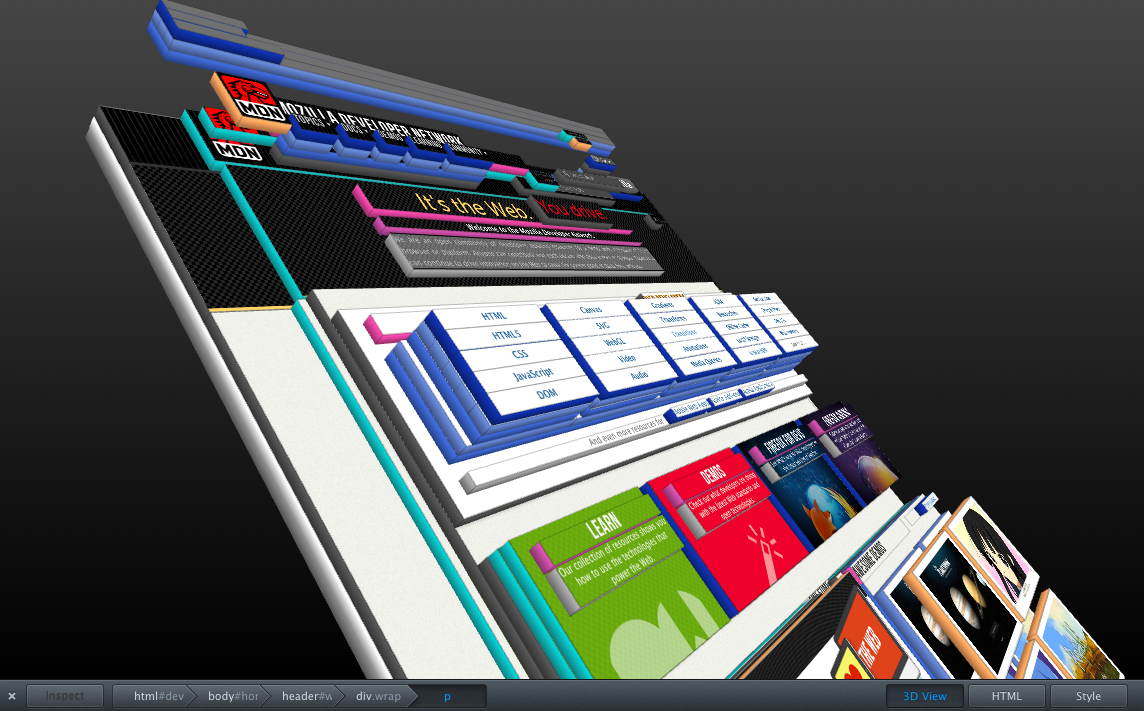
Mozilla has announced several new features for the new Firefox Beta which will eventually become Firefox 11. The first and, in my opinion, the most interesting one is a new approach to make distinguishing elements on a webpage easier using a 3D rendering of the page. They call it 'Tilt'. It is based off of WebGL technology and renders the website in a three-dementional view with each element layered one on top of the other making it easy to determine parent and child elements in a page. An interesting approach to the traditional indentation which only allowed the developer to see the differences in the code rather than on the page itself. This is a preview of the feature:
A couple of other technical features are SPDY support as well as a new styles editor which allows developers to edit a page's CSS files with live updating then save the changes to disk. One of the features I personally am most excited about is a simple thing which is one of my favourite things about Chrome and which is lacking in all other browsers: add-on sync. Not only will we not be able to sync bookmarks and history with Mozilla's sync service, but now add-ons as well. I am very much looking forward to that feature as it will make managing multiple installations of Firefox across different computers much easier to handle.
See Mozilla's blog post for more details about some of the upcoming new features in Firefox 11.
Separating browsers: home and work
Recently I've been experimenting with a different workflow when it comes to dividing my private tasks and my work. To make myself more efficient, I've essentially adopted a multi-browser system. I've already alluded to this system in a previous post, but now I will fully explain it.
I work with a system where I divide my private tasks and my work tasks between two different browsers. The default browser on my Mac, Apple Safari, is what I use for my private tasks. I use Safari for private tasks because it is the fastest and most integrated browser available for Mac OS X. For spell-checking Safari uses the built-in system-wide spell-checker which means when I add an unknown word to the system dictionary, that change will be reflected when I type in Safari. It is also fully compatible with the Mac OS X Services menu which I use in combination with Automator in order to create system-wide scripts which automate certain repetitive tasks. One of the simple things which makes me happy with Safari is the "Add Image to iPhoto Library" option when you right-click on an image. I use that to download images quite frequently and, even though it may be a very simple thing, it saves me the step of having to download it elsewhere, then import it into iPhoto. Safari also feels as though it's by far the quickest browser available for the Mac which is very important when frequently browsing the internet like I do. Some people may argue that Chrome is also a very good, fast, and integrated browser for the Mac, but I would argue otherwise.
For my web development work, I use Mozilla Firefox. I use Firefox for a couple of reasons, but primarily for the available web development tools. With Firefox 10 Mozilla released its own, integrated web inspector which allows you to view the HTML and CSS of any given element within a page. Safari and Chrome both have had this feature built-in for quite some time, but the way in which Mozilla has implemented it makes it far more usable. Both Safari and Chrome (which use the same web development tools) open a panel at the bottom of the window whereas Firefox 10 uses the entire window. You can also just look at the CSS or just look at the HTML if you wish, thus saving screen real estate. Before Firefox 10 I used Firebug. Whilst similar to the web development tools in Safari and Chrome, it had a very key difference for me. When dynamically changing the properties of an element in the web inspector you have to push the return key when using Safari or Chrome before the change is reflected. With Firebug you can change the property and wait about a second and the change is reflected. That may seem trivial, but it saves a great deal of time if you do that as frequently as I do because then you don't have to reselect the element. Combined with other add-ons such as Web Developer, ColorZilla, Open with Photoshop, Selenium, and Awesome Screenshot, Firefox is a very powerful tool for web development.
What are your thoughts about it? Which browser(s) do you use and for what reasons?
I work with a system where I divide my private tasks and my work tasks between two different browsers. The default browser on my Mac, Apple Safari, is what I use for my private tasks. I use Safari for private tasks because it is the fastest and most integrated browser available for Mac OS X. For spell-checking Safari uses the built-in system-wide spell-checker which means when I add an unknown word to the system dictionary, that change will be reflected when I type in Safari. It is also fully compatible with the Mac OS X Services menu which I use in combination with Automator in order to create system-wide scripts which automate certain repetitive tasks. One of the simple things which makes me happy with Safari is the "Add Image to iPhoto Library" option when you right-click on an image. I use that to download images quite frequently and, even though it may be a very simple thing, it saves me the step of having to download it elsewhere, then import it into iPhoto. Safari also feels as though it's by far the quickest browser available for the Mac which is very important when frequently browsing the internet like I do. Some people may argue that Chrome is also a very good, fast, and integrated browser for the Mac, but I would argue otherwise.
For my web development work, I use Mozilla Firefox. I use Firefox for a couple of reasons, but primarily for the available web development tools. With Firefox 10 Mozilla released its own, integrated web inspector which allows you to view the HTML and CSS of any given element within a page. Safari and Chrome both have had this feature built-in for quite some time, but the way in which Mozilla has implemented it makes it far more usable. Both Safari and Chrome (which use the same web development tools) open a panel at the bottom of the window whereas Firefox 10 uses the entire window. You can also just look at the CSS or just look at the HTML if you wish, thus saving screen real estate. Before Firefox 10 I used Firebug. Whilst similar to the web development tools in Safari and Chrome, it had a very key difference for me. When dynamically changing the properties of an element in the web inspector you have to push the return key when using Safari or Chrome before the change is reflected. With Firebug you can change the property and wait about a second and the change is reflected. That may seem trivial, but it saves a great deal of time if you do that as frequently as I do because then you don't have to reselect the element. Combined with other add-ons such as Web Developer, ColorZilla, Open with Photoshop, Selenium, and Awesome Screenshot, Firefox is a very powerful tool for web development.
What are your thoughts about it? Which browser(s) do you use and for what reasons?
Friday, February 3, 2012
Firefox 10 Mobile
I'm currently sitting in the waiting room at a train station waiting for my train to arrive. Whilst waiting I have been using the internet on my Android phone. My browser of choice for mobile browsing on Android is Firefox.
The reasons for this are pretty straight-forward. I enjoy using Firefox regardless of the platform mostly for ideological reasons. Mozilla is a non-profit organisation which supports many things I believe about the web such as openness and freedom online. I also appreciate what they are trying to accomplish with Firefox and am willing to give them my full support.
However, there are unfortunately a couple of things I somewhat dislike about Firefox for Android. It seems to be slower than the built-in browser (simply called 'Internet') and it hogs much more memory and CPU power. For a mobile phone, that is a problem. Other than that though, I find that it renders pages and performs remarkably accurately for being a mobile browser and would highly recommend anyone at least give it a go!
The reasons for this are pretty straight-forward. I enjoy using Firefox regardless of the platform mostly for ideological reasons. Mozilla is a non-profit organisation which supports many things I believe about the web such as openness and freedom online. I also appreciate what they are trying to accomplish with Firefox and am willing to give them my full support.
However, there are unfortunately a couple of things I somewhat dislike about Firefox for Android. It seems to be slower than the built-in browser (simply called 'Internet') and it hogs much more memory and CPU power. For a mobile phone, that is a problem. Other than that though, I find that it renders pages and performs remarkably accurately for being a mobile browser and would highly recommend anyone at least give it a go!
Tuesday, January 31, 2012
Firefox 10
Mozilla officially released Firefox 10 today. I've just downloaded it on both Windows and for Mac OS X and am playing around with it a bit. Visually it looks much like Firefox 9 with the exception of the back/forward button. The back button is now 'attached' to the address bar and the forward button is hidden except when it is possible to actually go forward rather than just be disabled like in previous versions.
Without looking at the release notes, I would say the biggest update that I've seen so far is the new web inspector. Mozilla has effectively created an in-house version of Firebug which is now built into Firefox. I'm a big fan of Firebug for web development and I'm excited to see what Mozilla has done. I've not really had a chance to work that much with it yet, but beginning tomorrow, I will spend a full work day with it. I have high hopes for it! Here's a video which demonstrates the new web inspector:
This version also sees the first step toward implementing silent background updates for the browser which is a feature planned for future versions. In preparation for this, Firefox now sees most add-ons as compatible with new versions of Firefox by default and will keep them enabled rather than disable them as it has always done in the past. Other updates include font anti-aliasing for WebGL, CSS3 3D transformations, full screen APIs to run a web application in full screen mode, a new element for bi-directional text isolation, and several bug fixes.
You can read the full release notes here and you can download Firefox 10 from Mozilla's website or, if you're running Firefox, by opening the About dialogue and choose 'Check for Updates'.
Without looking at the release notes, I would say the biggest update that I've seen so far is the new web inspector. Mozilla has effectively created an in-house version of Firebug which is now built into Firefox. I'm a big fan of Firebug for web development and I'm excited to see what Mozilla has done. I've not really had a chance to work that much with it yet, but beginning tomorrow, I will spend a full work day with it. I have high hopes for it! Here's a video which demonstrates the new web inspector:
This version also sees the first step toward implementing silent background updates for the browser which is a feature planned for future versions. In preparation for this, Firefox now sees most add-ons as compatible with new versions of Firefox by default and will keep them enabled rather than disable them as it has always done in the past. Other updates include font anti-aliasing for WebGL, CSS3 3D transformations, full screen APIs to run a web application in full screen mode, a new element for bi-directional text isolation, and several bug fixes.
You can read the full release notes here and you can download Firefox 10 from Mozilla's website or, if you're running Firefox, by opening the About dialogue and choose 'Check for Updates'.
Subscribe to:
Posts (Atom)


